Back in the early 1980s, most home computers came with BASIC in ROM. As soon as you switched the machine on, you were invited to write a program. Programming was easier to access than anything else on the machine. On many such machines it was also trivially simple to draw shapes on the screen. From simple lines, you could create triangles circles and more complex patterns, all using a few lines of BASIC. You discovered how to draw a graph of some mathematical function on the screen. When you made a mistake, you saw immediately what went wrong. This was interactive programming at its best.
If you happened to have a Commodore 64, you were not so lucky. BASIC did not support graphics commands and you needed to type a lot of pokes, just to get the VIC chip into graphics mode (at which time you could no longer read the normal text). Other machines, like the ZX Spectrum and the Acorn Electron really invited you to draw on the screen.
Acorn (BBC Micro, Electron, Archimedes, RiscPC)) added graphics support to the terminal driver. This way you could plot dots, lines and triangles by sending bytes to standard output. This was accessible to all programs, not just to BASIC. The Acorn terminal command set contains some pretty advanced features: you can set both a text and a graphics viewport and text or graphics output remains confined to the specified area (text even scrolls within that area). You can scroll in all directions and you can even redefine the bit patterns of the characters.
Unix terminals
When UNIX was introduced, terminals were still printing teletypes that could print only text. Interactively changing the text in the middle of the page just was not a thing. Some early video terminals could only add text to the bottom row and scrolled everyhing up, without any way to control the cursor. But that changed rather quickly and before long we had terminals that were capable of positioning the cursor anywhere on the screen and editors like vi could be implemented. It as all exclusively ASCII text though.
In the early 1980s we got some terminals that could display graphics. Some DEC terminals could display bitmaps using the sixel protocol. In this protocol, a column of six pixels is represented by a single character. Send many characters and you get a row if bitmap graphics, six pixels tall. It works the same way as some printers could draw graphics. At 9600 baud this was not particularly fast. No flashy games were possible. But you could prepare a high resolution bitmap of a diagram of graph and show that on the screen.
Some DEC terminals additionally had support for ReGIS (Remote Graphics Instruction Set). You could plot lines and circles etc. using simple commands. This is the closest to what Acorns VDU driver has to offer, but it was only available on very few terminals. Support of it died out rapidly. Of the modern Unix terminal emulators, only xterm supports it, but it is a compile-time feature that has to be specifically enabled and most distributions do not enable it (sixel support will typically be supported by default). For all practical purposes, ReGIS is dead.
Terminals with some graphics support gave way to X Terminals, which require a very complex software stack to be used.
Linux (and other PC Unix-like systems) tried to replicate what was available on typical Unix machines, not what contemporary PC hardware could support. Terminal drivers in Linux would replicate the vt220 command set (sort of), but no sixel support, let alone ReGIS. And of course X was available. But in order to make a program draw some lines in X, you have to learn a lot of APIs to make it possible and your application will now be a GUI application with an event loop, not a straightforward command line application that happens to draw some lines.
Modern Linux
Terminals in modern Linux do support drawing bitmap graphics, but there are at least three ways to do it:
- Sixel support, like the old DEC terminals could do. This is still supported in Xterm, but also in some other terminals, like Konsole on KDE.
- The Kitty protocol. This is supported by the kitty terminal, but it is also implemented in other modern terminals like Konsole and ghostty.
- The Framebuffer device, that can be used in the Linux console (when not running a GUI).
Data transfer using the Sixel protocol is now several orders of magnitude faster than it was in the 1980s, so now it is a totally practical way to render interactive games inside the terminal. Kitty and framebuffer can do this as well.
But some frequently used terminals, such as the GNOME terminal, do not support bitmap graphics at all. But all is not lost. Unicode supports symbols for legacy computing. There are several sets of symbols:
- The sextants, characters that consist of a matrix of 2×3 pixels. Characters like this were found on the TRS-80, the Mattel Aquarius and in Teletext. A 80×24 screen could show 160×72 blocks this way. Unicode fonts are unlikely to contain these characters, but many terminals (like the GNOME terminal) have dedicated support to show these. Konsole and Kitty also do a good job (but they have proper bitmap graphics as well).
- The octants, characters that consist of a matrix of 2×4 pixels A 80×24 screen could show 160×96 blocks this way. These are a fairly recent addition and are not well supported by many terminals. The Gnome terminal does support these. Interestingly enough, Kitty supports the characters in the dedicated octants range, but fails to render several characters that got defined in other ranges because they define the same block pattern.
- The braille patterns. Unicode contains a full set of 2×4 braille patterns, mostly shown as a rectangle of dots. However, these are not shown as a contiguous pattern of dots, you keep seeing the 2×4 blocks. But these are supported nearly everywhere. Much uglier than octants, but more widely supported.
In a typical Linux GUI, we can stretch a terminal window up to 160×80 characters (especially using a small font). and this allows us to get 320×240 bitmaps using sextants. This is usable for displaying photos and it is even possible to show video. With all these character based solutions, each character cell can contain only one foreground and one background colour, so there is some colour clash.
There is a library called notcurses https://github.com/dankamongmen/notcurses that can show bitmaps in a terminal using all protocols mentioned so far. But this is a rather heavyweight library and it is focused on showing bitmaps, not on simple line drawing.
Terminal Bitmap Library
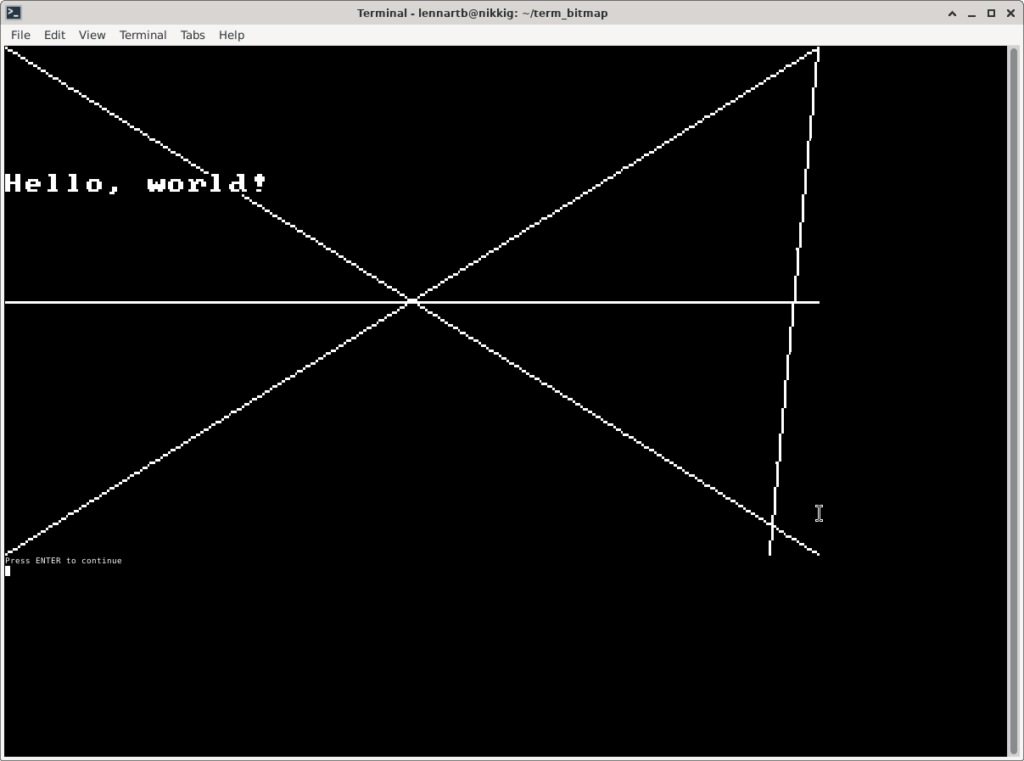
Right now I am developing a lightweight library in C that can draw lines, pixels and text (and will add triangles and circles) using simple function calls. I started a github project https://github.com/lennart-benschop/term_bitmap No stuff is there yet, but that can change. The intention is that we can link this to a FORTH or BASIC interpreter and get easy line drawing from these.
Below is an Xfce4 terminal, stretched to more than 160 chars wide and more than 50 chars tall (tiny font), showing a 320×200 bitmap using octants. Only monochrome is supported right now.
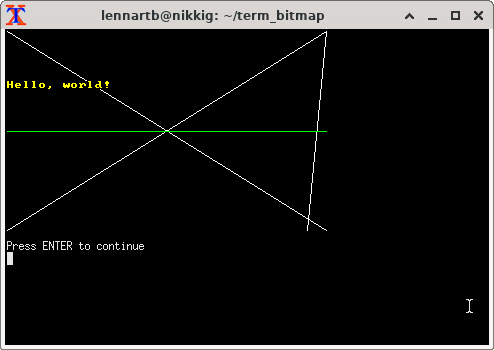
Here is the same image rendered using sixels in xterm and now in colour.
Leave a Reply